Projects

01Public repository

Visualize_prtebd

Generate traceable protein embeddings with Hugging Face protein language models and visualize them with t-SNE and UMAP.

View repository
Input
Sequence and family columns in a CSV file
Process
Protein language model embeddings → t-SNE / UMAP
Output
Embeddings, linked records, model metadata, and PNG/SVG plots
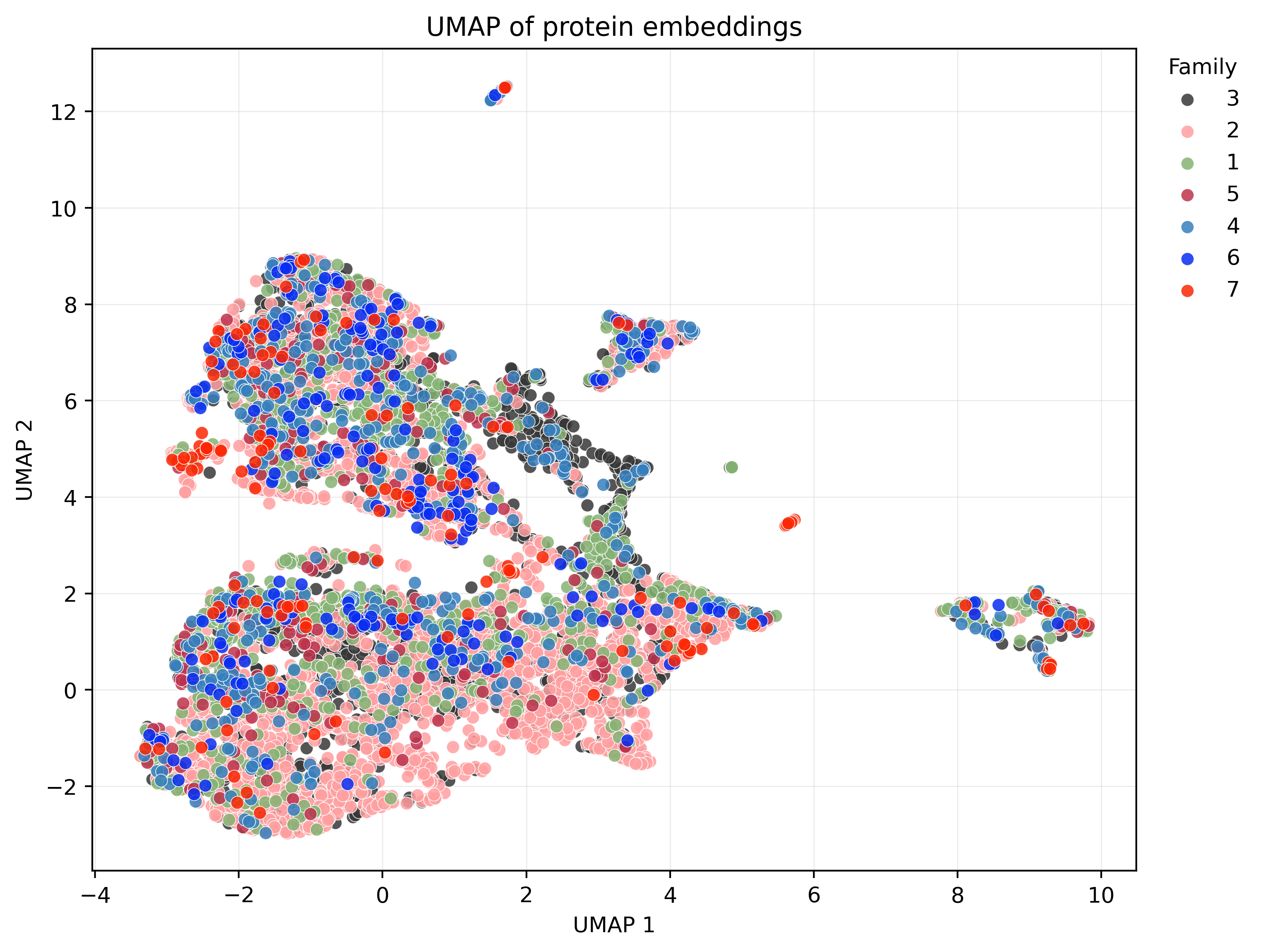
Explore a real UMAP output
UMAP projection of 7,757 protein embeddings from Biohub/ESMC-600M, colored by the first EC digit.
Example output · 7,757 sequences · Biohub/ESMC-600M · mean pooling · colors indicate the first EC digit.
Features & use case

Explore protein sequence representations with reproducible, family-colored projections.

PythonProtein language modelsHugging Facet-SNE / UMAP
  • Supports ESMC, ESM-2, ProtT5, and custom Hugging Face checkpoints.
  • Exports embeddings, source-linked records, and model metadata.
  • Produces reproducible PNG/SVG plots and dimensionality-reduction coordinates.
02Public repository

PEKP

Collect models for predicting enzyme kinetic parameters in one compact, parameter-organized reference.

View repository
Choose
A target parameter: kcat, Km, or kcat/Km
Browse
Models grouped by parameter, with publication years
Follow up
Read the linked paper and public implementation when available
Example lookup

Looking for a Km predictor? Start in the Km section, compare publication years, then follow the paper and implementation links to check the method against your data.

Features & use case

Find a starting point for choosing an enzyme kinetic parameter prediction model.

Enzyme kineticskcatKmModel collection
  • Groups model links into kcat, Km, and kcat/Km sections.
  • Records the publication year alongside each model.
  • Includes links to public implementations and papers when available.
03Public repository

Haru

A desktop Japanese-learning app for Chinese speakers, with AI-generated lessons, flashcards, grammar explanations, and reading practice.
View repository
Set up
Add a Chat Completions-compatible AI service and model in Preferences
Learn
Generate a daily lesson with kana, vocabulary, examples, listening, and exercises
Review
Revisit saved lessons and flashcards, then explore grammar and JLPT practice
First lesson walkthrough

Choose the first Daily Lesson and select AI Create Lesson. Study the generated material, then save flashcards for later offline review.

Features & use case

Learn Japanese from the beginning with Chinese explanations and daily practice on a desktop computer.

Japanese learningLLMDesktop appmacOS / Windows
  • Creates daily lessons covering kana, vocabulary, example sentences, listening, and exercises.
  • Includes flashcards, a grammar decoder, JLPT N5–N1 practice, and Japanese stories.
  • Keeps saved lessons and flashcards available for offline review.